







.png)

Each June, marketers collectively hold their breath to see what changes Apple will debut at its Worldwide Developers Conference.
This year, anticipation was especially high with the introduction of Siri AI, a reimagined version of Siri described as “profoundly more intelligent, knowledgeable, and capable.” While speculation pointed to a Gmail AI Inbox-style overhaul, those changes didn’t fully materialize, at least not yet.
Still, Apple introduced meaningful updates to Apple Intelligence that directly reshape how people discover, prioritize, and engage with email.
Improved Mail Search
One of the most impactful updates coming in iOS 27 is an improved Apple Mail search experience.
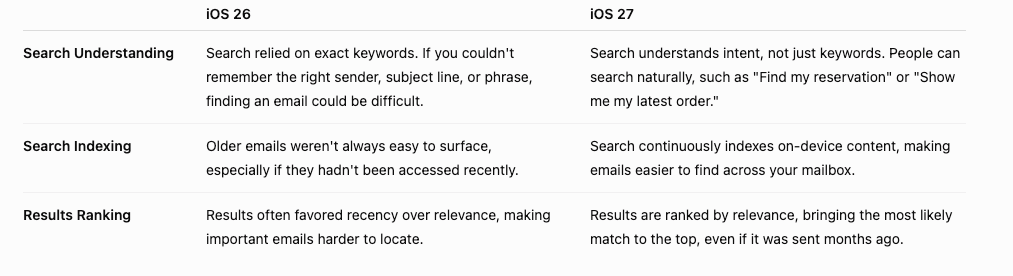
Historically, search has been keyword-driven, requiring users to remember exact sender names, subject lines, or phrases to locate a message. But remembering exact details isn't always the easiest or most natural way for people to find what they're looking for.
Instead, most customers think in terms of intent: “Find my reservation,” “Show me my order confirmation,” “Where is my latest update?”
To better match this behavior, Apple is completely rebuilding their inbox search, moving away from keyword-based indexing to intent-based indexing.
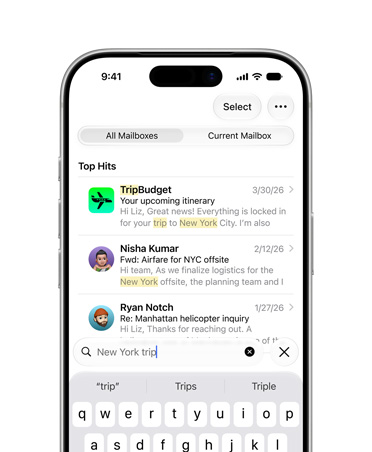
As Stacey Ford, Apple’s Vice President of OS Program Management put it, “The goal is to bring the most relevant results to the top, helping users find what they need right away — even if it’s buried deep in their inbox.”
iOS 26 vs iOS 27: What’s Changed?
What This Means for Marketers
For consumers, this means less time searching and more time acting. For marketers, it’s another sign that AI is reshaping not just how emails are delivered, but how they're designed and deployed.
The move from searchability based on direct keywords to semantic intent is not unique to Apple. Google has done the same thing in their recent releases, reinforcing a set of durable best practices.
- Clear, descriptive subject lines: If a user asks about expiring loyalty points, is that language reflected in your subject line or preview text?
- Meaningful live text: Don’t hide critical promotional details inside images.
- Intent-aligned copy: AI models evaluate meaning, not just keywords. Clarity beats cleverness.
- Structured data formats: Supporting formats like Schema.Org become even more valuable as AI relies on structured information to understand email content.
In addition, with improved inbox search, users will increasingly rediscover and reengage with older messages as they search their inbox. That creates a new challenge, but also a new opportunity for real-time personalization.
Imagine a user searching their inbox for an email they previously saw for an upcoming trip to New York. With the iOS 27 changes, they’re much more likely to find that email. But what about the content inside it? When they revisit, are the deals expired? Sold out? Has the pricing or availability changed?
Without dynamic content that updates in real time, reengaging with outdated promotions or stale offers can create friction, weakening the experience and increasing unsubscribe risk.
Now imagine a different approach: content that updates at the moment of interaction. The same email dynamically reflects current offers, availability, or status. Instead of frustration, the customer sees information that is timely, relevant, and useful.
For marketers, emails are no longer just campaigns sent at a single point in time. They become part of a customer’s broader digital journey, and as such, content needs to remain relevant and useful long after the initial send.

.png)
.png)

.png)
.png)
.png)


